What Disappears From A PDF Estimate: Xactimate Trade Data
Xactimate Learn
Mar 30, 2026
Zach Gardner, CEO @ClaimsFlow
You Can't Tell Who Does the Work From a Xactimate PDF
This post is part of the What the PDF Doesn't Tell You series — a look at what gets lost when an Xactimate estimate becomes a PDF, and why it matters.
Consider a line item on a PDF estimate: Apply plant-based anti-microbial to floors.
The description is clear. But which trade does this line item belong to? Is it WTR (Water extraction & remediation), HMR (Hazardous material remediation), or TCR (Trauma/crime scene remediation)?
Each answer implies different billing, different compliance standards, and different cost justification. In Xactimate, the trade code makes this obvious. However, on the PDF, it's unclear. You're left to interpret ... or guess.
This is what happens when trade data disappears from an estimate. It matters for anyone building work orders, creating budgets, or reviewing scope from a PDF. In fact, it's one of the most consequential things the PDF strips out, and one of the key reasons estimators must convert PDF estimates back to Xactimate.
What the PDF Strips Out
In Xactimate, every line item carries structured codes: a trade code that identifies the responsible trade (PNT, DRY, FLR, WTR, HMR, TCR, etc.) and a selector code that identifies the specific material or repair action.
The PDF has the line item description and quantity. But the associated codes disappear.
This creates ambiguity. 1/4" Cement Board could be Flooring or Tile. Seal & paint baseboard needs to be mapped to PNT. Negative air fan/Air scrubber (24 hr period) could fall under multiple mitigation trades. For a single line item, you can probably figure it out. For an estimate with hundreds of line items across dozens of rooms, the work required to interpret correctly becomes overwhelming.
Trade codes also aren't the only line-item-level data the PDF strips. Each line item also carries an activity — remove, replace, reinstall, material only, etc. The activity tells you the type of work, not just who does it. "Remove drywall" and "Replace drywall" are different scopes, different costs, and often different crews. The PDF description sometimes implies the activity, but not always clearly, and never in a structured, sortable way.
Trade and activity work together in Xactimate. The PDF misses both.
1. Why It Matters for Contractors
Insurance estimates are organized by room. Your crews, however, work by trade: demo, drywall, paint, flooring.
To create work orders and budgets from an adjuster's estimate, every line item has to be mapped from a room-based scope to a trade-based assignment. From a PDF, this mapping is entirely manual. A project manager reads each description, determines (or, in some cases, guesses) the correct trade, and assigns it to the right subcontractor's work order.
For a large loss with hundreds of line items across dozens of rooms, this takes hours. It's also error-prone. A line item assigned to the wrong trade means the wrong crew gets scoped for the work, the budget doesn't match the actual cost, and the project manager is left reconciling the difference after the fact.
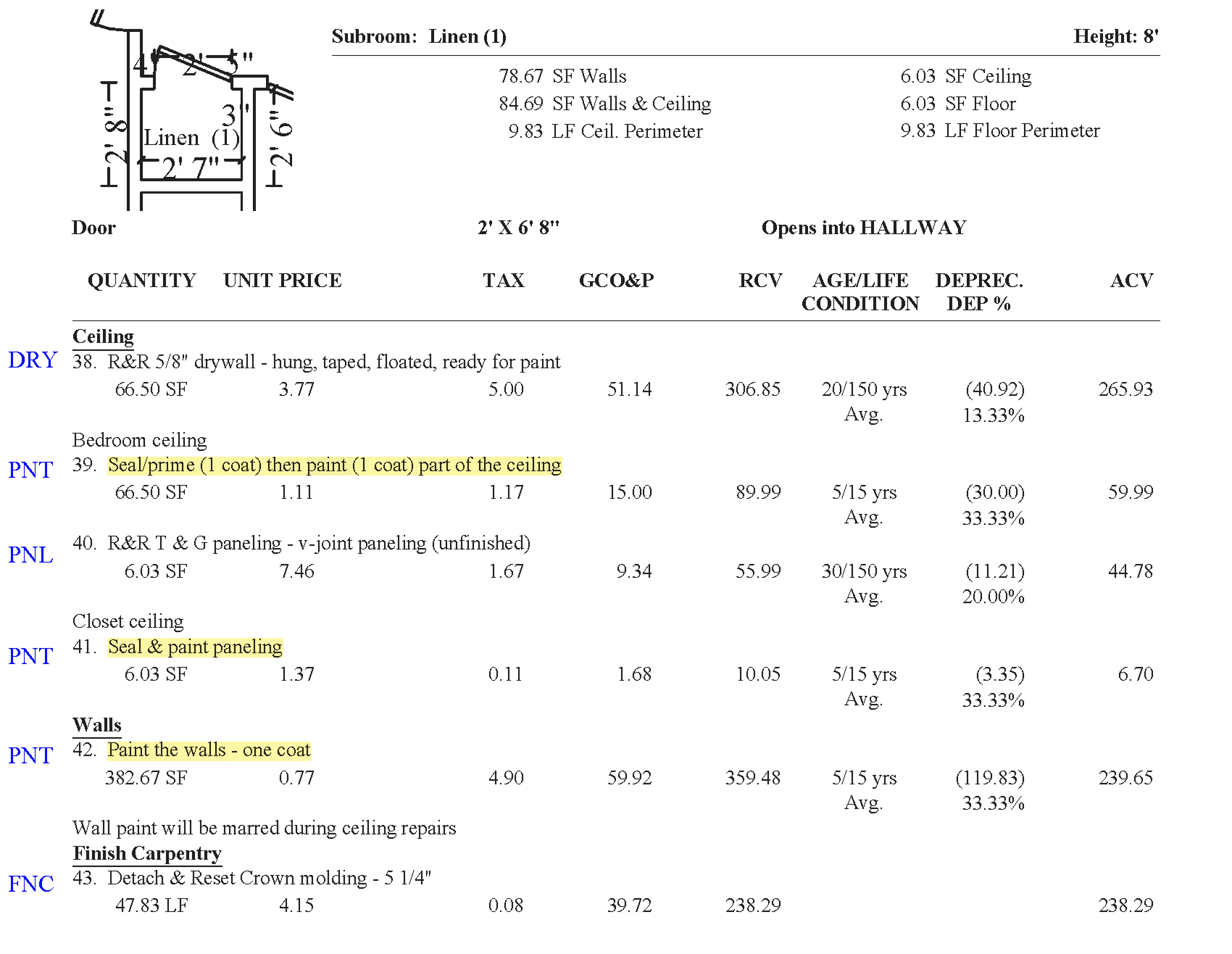
Before ClaimsFlow, this was the daily reality at J&J Remodeling during surge events. Production managers combed through insurance-approved PDF scopes, manually mapped every line item to a specific trade — e.g. Seal (1 coat) & paint (2 coats) baseboard → PNT — and built work orders and budgets by hand. It was tedious, error-prone work that often led to unclear budgets and cost overruns.
"At the end of the day, ClaimsFlow is really saving the project manager's ass from doing things out of budget."
— William Ledbetter, Head of Estimating, J&J Remodeling
The problem scales with the size of the loss. A 50-line item roof estimate is manageable. A 1,000-line item fire loss across 25 rooms is not. And the longer the mapping takes, the longer it takes to get crews on site, the longer the project sits idle, and the more likely the budget drifts.
2. Why It Matters for Reviewers and Consultants
Building consultants and mitigation reviewers need trade data for a different reason: to evaluate whether an estimate's scope and cost are appropriate.
Let's go back to the anti-microbial example. If the trade is WTR, the reviewer evaluates the line item against water remediation standards and pricing. If it's HMR, the compliance requirements and cost justification change entirely. The trade code determines what the contractor is billing for, and whether that billing is justified.
Without the trade code, the reviewer has to manually look up every ambiguous line item or rely on context clues in the description. For a straightforward estimate, this is manageable. For a large or complex loss with overlapping trades, it becomes a significant bottleneck. It's one of the core reasons mitigation bill review has a PDF conversion problem.
The cost runs in both directions. For carriers, estimates that aren't accurately reviewed. For contractors, legitimate scope that gets questioned or denied because the reviewer couldn't verify the trade from the PDF alone.
How PDF to ESX Conversion Restores Trade and Activity Data
ClaimsFlow's PDF to ESX conversion restores trade, selector, and activity codes to every line item. The estimate you receive isn't a flat list of descriptions — it's the full Xactimate project with the same trade and activity structure as the original.
Before you download the ESX, you can sort and filter line items by trade in the ClaimsFlow dashboard. For contractors, that means work orders and budgets built from accurate trade assignments — not manual guesswork. For reviewers and consultants, it means you can see exactly what trade each line item belongs to before you begin your analysis.
Trade and activity data are just two of the things the PDF strips out. The project tree flattens the estimate's organizational structure. Custom line items lose their green highlighting. Pricing, O&P, and F9 notes can disappear depending on the report type. See the full picture in What the PDF Doesn't Tell You.
Try It On Your Next Estimate
Upload a PDF estimate and see trade and activity data restored on every line item. Try for free at claimsflow.io.
Related articles:

