Why Restoration Contractors Need the ESX, Not Just the PDF
Learn
Mar 18, 2026
Zach Gardner, CEO @ClaimsFlow
Short answer: Contractors convert PDF estimates to ESX because Xactimate can’t open a PDF, and the PDF strips out what they need to work: the project tree, trade codes, quantities, and notes. With the ESX, you can check scope, build work orders by trade, compare pricing to your costs, and budget from the adjuster’s own numbers. Here’s how to convert a PDF to ESX, step by step.
Why Builders Should Care About Xactimate (Even If They Don’t Write Estimates)
You receive a 80-page PDF from a your counterparty – a building consultant, or a public adjuster, or a carrier.
Maybe you’re bidding competitively. Maybe you’ve already won the job and need to understand if the current budget works or if it’ll need a supplement.
Either way you need to review it to answer some fundamental questions about the job:
Does this the right scope for this project?
Can I make money on this?
Will I have to supplement?
What do I need for my crews to get started?
You start going page by page, room by room, line by line – checking scope, mapping line items by trade, pulling quantities and costs into a spreadsheet.
Four hours later, you have a rough budget.
Did you miss anything?
It’s probably hard to say at the moment. You might realize after you’ve started work that the initial estimate left out some line items and you have to request a supplement.
Here’s the problem: the estimate was built in Xactimate, the industry standard for property insurance estimating. Xactimate estimates are rich, dynamic and searchable. However, you received a PDF, a flattened facsimile, stripped of all that structure and context.
This matters because your bid, and your budget, and work orders are all downstream of the information that’s in that locked file. Delays here ripple through everything that follows.
The PDF isn’t meant for contractor work
Xactimate estimate offers a rich representation of the loss – a complete project tree, room breakdowns, quantities and unit costs. Export it as a PDF, however, and all that structure disappears. You’re left with a document meant for reference and reading, not working.
However, as a contractor, you do need to work with this document for the following reasons – and the PDF makes each harder than it needs to be.
Catch scope gaps
Is every room accounted for? Is demo included? Paint masking?Content manipulation?
Finding out what’s missing is the key part. And the PDF make is harder than it needs to be. On a PDF, there’s no project tree to navigate, no search, no sort, no filter. You’re going line by line with a pen and highlighter, hoping that you don’t miss anything.
Break the estimate into work orders by trade
Insurance estimates are organized by room. Your crews, however, work by trade — demo, drywall, paint, flooring. Every line item description has to be mapped to the correct trade
From a PDF, this is a manual exercise.
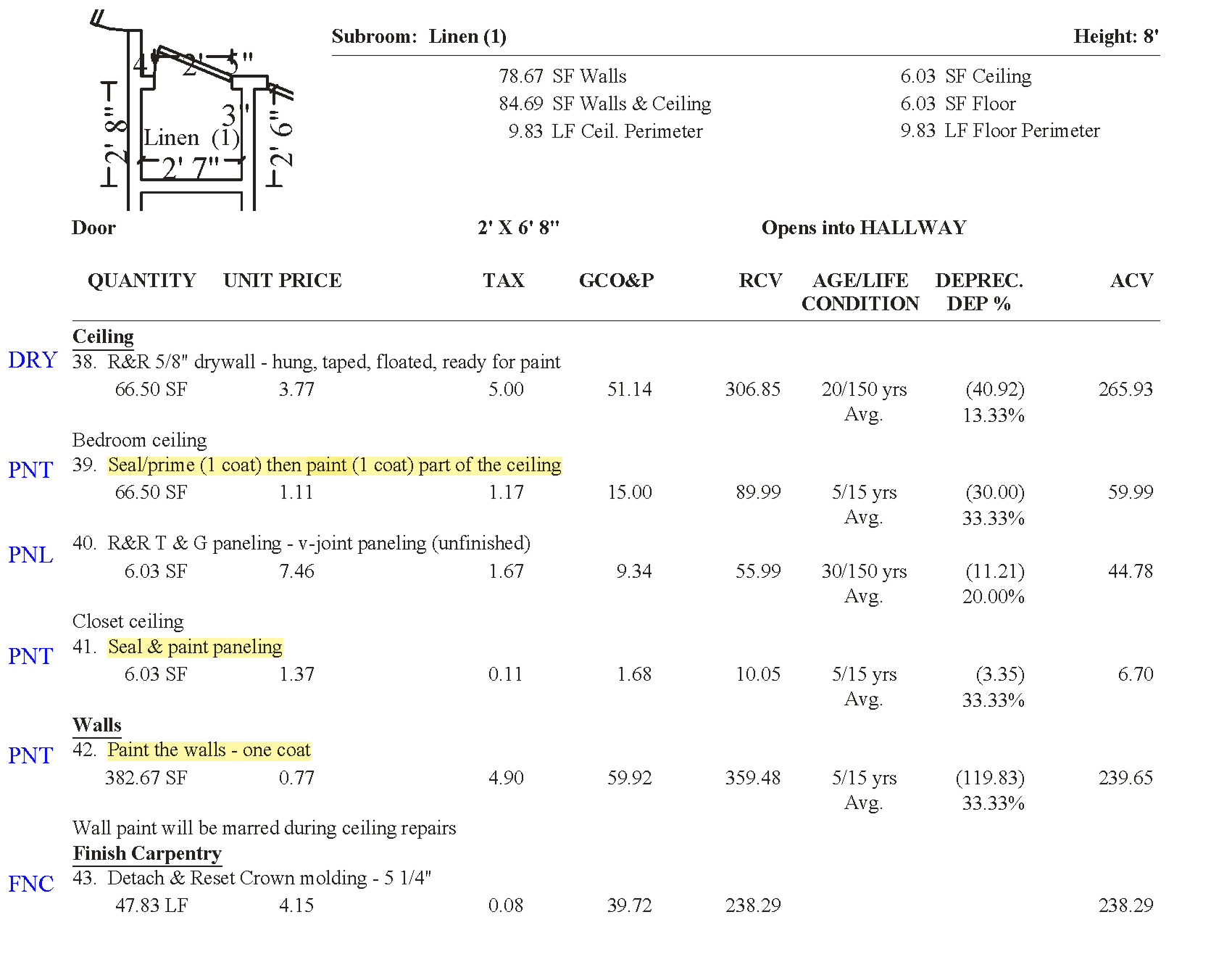
Compare pricing against your actual costs
Xactimate prices are market-based. They may or may not reflect what the work actually costs you. Are the labor rates sufficient? Are material prices current? Where are your margins thin?
Answering those questions means putting the estimate’s line items next to your own numbers. From a PDF, you’re manually re-entering everything before you can even start.
Build your budget against the estimate
You need to pull quantities and RCV from the estimate and build a budget that ties back to it line by line. If it doesn’t, you’re guessing at whether the job pencils out.
Again, from a PDF, that means manual data entry.
Xactimate produces the financial blueprint for every job. Getting access to rich estimate data allows you to bid accurately, catch scope gaps early, build clean work orders, and know whether a job is profitable before you start it.
Getting the ESX When All You Have Is the PDF
If the adjuster won’t send the ESX, rebuild it by hand or convert the PDF. Our guide covers both: how to convert a PDF to ESX.
No more re-keying. No more guessing at what’s on page thirty-six. The data was always there. Now you can use it.
Try it on your next scope at claimsflow.io
Frequently Asked Questions
Can Xactimate open a PDF estimate?
No. Xactimate can’t import a PDF. You either re-enter the estimate by hand or convert it to an ESX file and import that. See How to Convert a PDF to ESX for Xactimate.
What’s the difference between a PDF estimate and an ESX file?
ESX is Xactimate’s native project format. It holds the line item codes, project tree, trade codes, F9 notes, room dimensions and Sketch. A PDF keeps the descriptions and numbers but drops the structure. More in PDF vs. ESX.
How long does it take to convert a PDF estimate to Xactimate?
Re-entering a large estimate by hand takes two to five hours, mostly spent searching for line items. With ClaimsFlow, it takes minutes regardless of file size.
Do contractors need Xactimate if they don’t write insurance estimates?
If you build from insurance scopes, your work depends on Xactimate data whether or not you write estimates. With the ESX, you review scope, supplement and budget from the same data the adjuster used. It also syncs to job management platforms like DASH, PSA and Encircle.
Which PDF estimates can be converted?
Any Xactimate-generated PDF, including large-loss files with 1,000+ line items.
How do I know the converted estimate is accurate?
Check four things: the RCV total matches the PDF to the dollar, the line item count matches, the project tree matches, and custom items are flagged. ClaimsFlow shows these checks before you download.
Can I build work orders by trade from a converted estimate?
Yes. Every line item in the ESX carries a trade code, so you can group the scope by trade instead of by room. See How to Build Job Budgets and Work Orders from PDF Estimates.
Does ClaimsFlow convert the Sketch too?
Yes. It rebuilds the interior floor plan as an editable Xactimate Sketch. See the Sketch Conversion FAQ.
Related articles:
- How J&J Remodeling Built a Faster Workflow with ClaimsFlow
- The Project Tree: How to See the Shape of a Loss
- Green Items: The Hidden Cost of Custom Line Items in PDF Estimates

